

Introduction
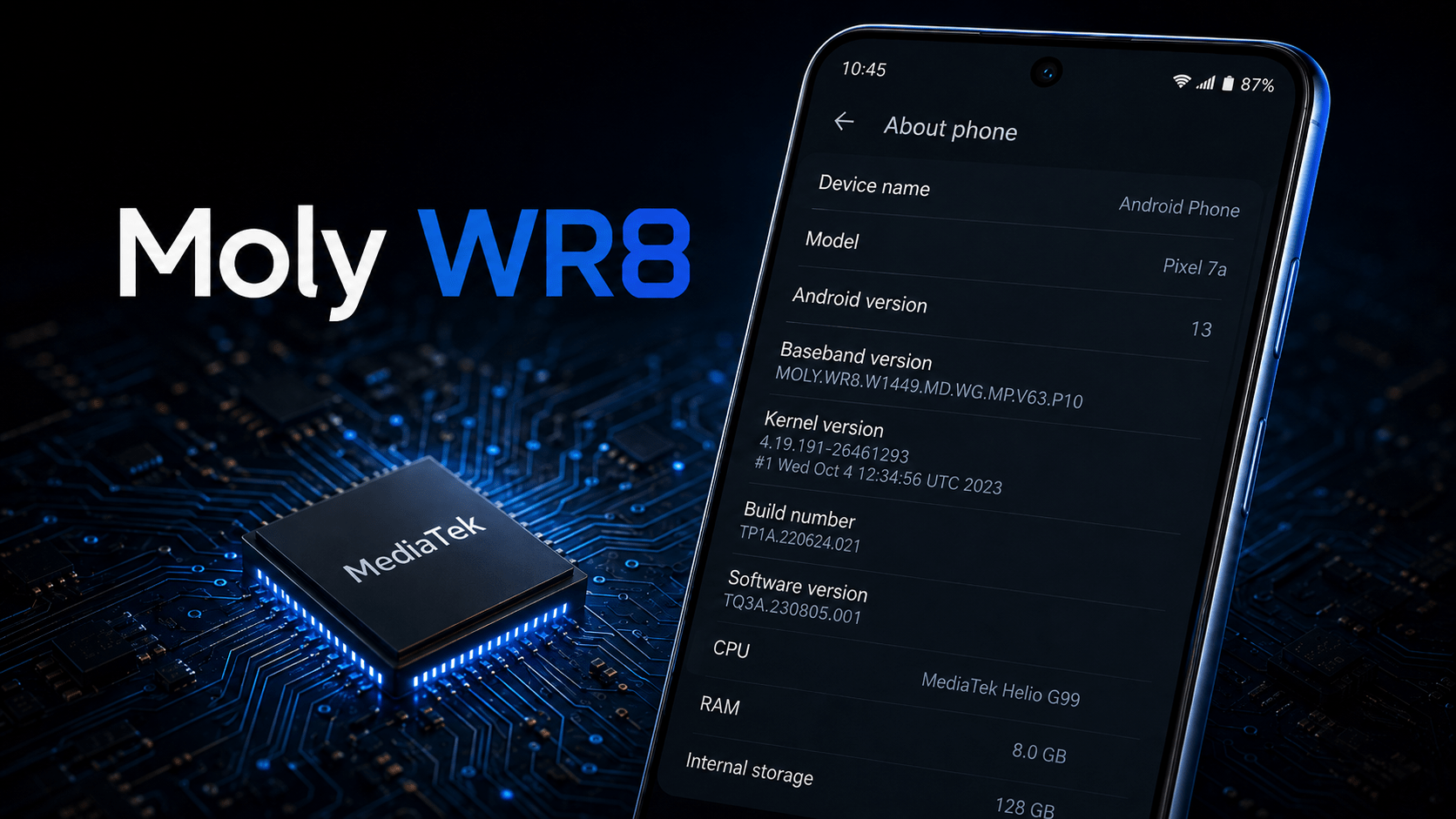
Moly WR8 is not a phone, tablet, smartwatch, or consumer electronics brand. It is usually part of a technical baseband version displayed in the settings of certain Android devices.
A complete version may look similar to:
MOLY.WR8.W1449.MD.WG.MP.V23.P8
This code belongs to the device’s radio or modem firmware. Android’s official source code describes the baseband value as the radio firmware version, which is separate from the device’s model name and Android operating system version.
TABLE OF CONTENT
People often search for Moly WR8 after finding it under Settings > About phone and mistakenly assume it is their device model. However, the same Moly WR8 family has appeared on different phones, tablets, and Android smartwatches. Therefore, it cannot identify one exact device. Table of Contents
- What is Moly WR8?
- Is Moly WR8 a device model?
- What does the Moly WR8 code mean?
- Which devices use Moly WR8?
- What does baseband firmware do?
- Can Moly WR8 identify your processor?
- How to identify your exact device
- Is Moly WR8 connected to fake phones?
- Should you update or flash the baseband?
- Common Moly WR8 problems
- Frequently asked questions
What Is Moly WR8?
Moly WR8 is a name found inside the baseband version string of some Android devices. The baseband is the software used by a device’s cellular radio or modem.
It helps the mobile hardware communicate with cellular networks for functions such as:
- Detecting a SIM card
- Connecting to a mobile network
- Making and receiving calls
- Sending and receiving text messages
- Using mobile data
- Managing supported cellular frequencies
Android treats the radio firmware as a separate part of the device software. The Android Open Source Project also explains that system updates can update components outside the main Android system, including the baseband or radio processor.
For this reason, Moly WR8 should be understood as a firmware identifier, not a product name.
Is Moly WR8 a Device Model?
No. Moly WR8 is not a complete device model.
The same or similar Moly WR8 baseband strings have appeared on several unrelated products. Examples found during research include:
- Ulefone Note 7 smartphones
- AllCall W1 Android smartwatches
- BLU Dash 5.5 smartphones
- Generic Android tablets
- Devices using the MediaTek MT6580 platform
For example, confirmed Ulefone Note 7 software records include versions beginning with MOLY.WR8.W1449. An AllCall W1 smartwatch has also been reported with a MOLY.WR8.W1449 baseband.
A separate hardware record connects another Moly WR8 version with the MediaTek MT6580 platform.
These examples prove that Moly WR8 does not refer to one particular device. It is shared across multiple products that use compatible modem platforms or firmware families.
Understanding the Moly WR8 Version Code
A Moly WR8 baseband string may appear as:
MOLY.WR8.W1449.MD.WG.MP.V57.P2
The exact internal meaning of every character has not been clearly documented in public consumer guides. Therefore, it would be inaccurate to assign an unverified full form to every section.
However, the code can be understood generally.
MOLY.WR8
This identifies the modem firmware family or development branch. It is the part users commonly notice when checking their baseband details.
W1449 or W1315
This section separates different firmware branches or platform generations. Devices with W1449 may use a different modem build from devices showing W1315.
It is not the device’s commercial model number.
MD.WG.MP
These are internal modem build identifiers. Their exact expansion may depend on the vendor’s development system and is not normally useful to an everyday device owner.
V57 or Similar Number
The letter “V” is followed by a version or revision number. A higher number does not automatically mean the device is newer or more powerful because different manufacturers may use separate firmware branches.
P2, P8, or P17
This usually acts as an additional firmware revision or patch identifier. It should not be confused with an Android security patch level.
Build Date
Some baseband strings end with a date and time. This normally shows when that particular modem firmware build was compiled.
The code is mainly useful to technicians who need to compare firmware versions. It does not provide a simple consumer-friendly description of the device.
What Does Moly WR8 Tell You About a Device?
A Moly WR8 version can provide a few technical clues.
It may indicate that:
- The device uses a MediaTek-related modem platform
- The device includes cellular radio hardware
- The displayed value belongs to the modem firmware
- The product may belong to an older or entry-level Android hardware family
- A particular modem build or revision is installed
However, It does not reliably reveal:
- The exact brand
- The exact phone or tablet model
- Screen size
- RAM capacity
- Storage capacity
- Camera quality
- Battery size
- Android version
- Supported 3G or 4G bands
- Whether the device is original or counterfeit
This distinction is important. Android maintains separate values for the consumer-visible device model, system-on-chip model, bootloader and radio firmware.
Which Processors Are Associated With Moly WR8?
Research results commonly connect Moly WR8 strings with older MediaTek platforms, especially the MT6580 and MT6582 families.
One device record lists:
- Platform: MT6580
- CPU family: Cortex-A7
- Modem:
MOLY.WR8.W1449
Another device document associates a Moly WR8 baseband with an MT6582-powered Android product.
This does not mean every This device uses exactly the same processor. A modem firmware family can appear across multiple hardware designs and product categories.
Therefore, users should confirm the processor separately instead of identifying it from the baseband alone.
How to Identify the Exact Moly WR8 Device
When an Android device only shows Moly WR8 in its baseband details, use the following methods to find its real identity.
1. Check Model and Hardware Information
Open
Settings > About phone > Model and hardware
Google’s Android Help documentation recommends this section for finding manufacturer information. The SIM Status section can also provide carrier and network details.
Look for:
- Manufacturer
- Brand
- Model name
- Model number
- Build number
- Hardware version
Do not use the baseband version as the model number.
Check the Device Label
Turn off the device and inspect:
- The rear cover
- The area beneath a removable battery
- The SIM tray
- The original box
- The purchase receipt
- Regulatory or certification labels
The actual model number is often printed in one of these places.
Check the Build Number
The Android build number can offer more useful identification clues. Google explains that the Android version, security update and build number can be found inside the About phone or Android version section.
Search the complete build number together with the visible brand or model.
Use a Trusted Hardware Information App
A reputable device-information application may display:
- System-on-chip name
- CPU architecture
- Screen resolution
- RAM
- Storage
- Hardware board
- Product name
- Manufacturer properties
Be aware that some unofficial or modified Android devices may report inaccurate software information. Compare results from more than one source where possible.
Does Moly WR8 Mean the Device Is Fake?
No. The presence of Moly WR8 does not automatically mean a device is fake.
The baseband family has appeared on identifiable branded products, including the Ulefone Note 7, AllCall W1 and BLU Dash 5.5.
However, similar baseband versions have also been found on generic and imitation Android devices. Some low-cost devices may display a well-known phone name even though their internal hardware is based on an older MediaTek platform.
Therefore, It alone cannot confirm whether a product is:
- Original
- Counterfeit
- Refurbished
- Rebranded
- Generic
- Modified
To check authenticity, compare the model number, processor, screen specifications, RAM, storage and device certification with the manufacturer’s official product information.
Should You Flash or Replace Moly WR8 Firmware?
Users should not download and install firmware based only on the words Moly WR8.
Many unrelated devices share similar Moly WR8 baseband names. Their hardware may still differ in important areas such as:
- Display controller
- Touchscreen controller
- Camera sensors
- Storage chip
- Cellular bands
- Memory layout
- Modem configuration
- Motherboard revision
Installing a modem or firmware image made for another device can cause serious problems. These may include loss of cellular service, an unknown baseband message, SIM detection failure or a device that no longer starts correctly.
Android documentation confirms that the radio or baseband is a separate software component that can be updated independently from the main system.
Only use firmware that matches the exact:
- Brand
- Model number
- Board name
- Processor
- Hardware revision
- Storage configuration
- Regional version
The safest option is an official update supplied through the device settings or directly by the manufacturer.
Common Moly WR8 Problems
Unknown Baseband
“Unknown baseband” means Android cannot correctly read or communicate with the modem firmware.
Possible causes include:
- Damaged modem firmware
- Incorrect ROM installation
- Incompatible modem image
- Corrupted system files
- Hardware failure
A normal app cannot usually repair damaged radio firmware.
No SIM Card Detected
First check the SIM card in another phone. Also inspect the SIM slot and restart the device.
If multiple working SIM cards are not detected, the problem may involve the SIM reader, modem configuration or device hardware.
No Mobile Network
A device may detect the SIM but fail to register on a network because of:
- Unsupported network bands
- Carrier restrictions
- Incorrect network settings
- Weak coverage
- Modem firmware problems
- A damaged antenna
The Moly WR8 code does not confirm which network bands the device supports.
No Official Software Updates
Moly WR8 does not determine whether an Android update is available. Updates are provided by the device manufacturer and depend on the exact model, hardware and software build.
Google recommends checking under Settings > System > Software updates and following the instructions provided by the device.
Frequently Asked Questions
What is Moly WR8?
It is part of a baseband or modem firmware version found on some Android devices. It is not a device brand or model.
Is Moly WR8 a smartphone?
No. It can appear on smartphones, tablets and cellular smartwatches. It describes radio firmware rather than the complete product.
Is Moly WR8 made by MediaTek?
Moly WR8 strings are commonly found on devices using MediaTek platforms such as MT6580 and MT6582. However, the complete device may be manufactured or branded by another company.
Can Moly WR8 identify my phone model?
No. Several unrelated devices use similar Moly WR8 versions. Check the model and hardware section, product label, build number and motherboard details.
Does Moly WR8 support 4G?
The baseband name alone cannot confirm 4G support. Network support depends on the processor, modem hardware, antenna design, firmware configuration and regional frequency bands.
Is Moly WR8 malware?
No evidence indicates that Moly WR8 itself is malware. It is a technical firmware identifier shown by Android.
Can I update Moly WR8?
The baseband may be updated as part of an official firmware or system update. Do not install a random modem file based only on a similar to this code.
Why does my device display Moly WR8 instead of a brand?
You may be looking at the baseband version rather than the model section. Open the device’s About phone settings and find “Model and hardware.”
Conclusion
Moly WR8 is a baseband firmware identifier, not the name of a specific device. It is most commonly associated with modem software found on certain MediaTek-powered Android phones, tablets and smartwatches.
The code can help technicians compare modem firmware revisions, but it cannot identify the exact brand, model, Android version or hardware specifications.
Anyone trying to identify a device should examine the model number, build number, processor, board platform and physical product label. Users should also avoid flashing firmware based only on the baseband name because many different devices share similar Moly WR8 strings.
Key Takeaways
- It is not a device model.
- It is part of an Android baseband or radio firmware version.
- It commonly appears on some MediaTek-powered devices.
- Similar versions are used across different phones, tablets and smartwatches.
- The code cannot confirm the device’s brand.
- It does not automatically mean the device is fake.
- Never download firmware.
- Use the model number, build number and board platform to identify the device.